
Jellyfin을 쓰다 보면 라이브러리가 점점 늘어나는데, 기본 검색 기능으로는 라이브러리 자체를 검색할 수가 없습니다. 영화나 드라마 같은 콘텐츠만 검색되고, 정작 라이브러리는 검색 결과에 안 뜹니다.
저는 라이브러리가 꽤 많은 편이라 이게 은근히 불편했습니다. 매번 홈 화면에서 스크롤하면서 찾거나, 사이드바에서 하나씩 눌러보는 게 번거로웠거든요.
이 문제를 Custom JavaScript 플러그인으로 해결할 수 있습니다. 검색창에 라이브러리 이름을 치면 바로 결과가 뜨도록 만드는 건데, 설정 자체는 어렵지 않으니 따라 해보시면 됩니다.
플러그인 저장소 추가하기

먼저 Jellyfin 관리자 대시보드에 들어가서 플러그인 탭으로 이동합니다. 그다음 우측 상단에 있는 Manage Repositories를 클릭합니다.
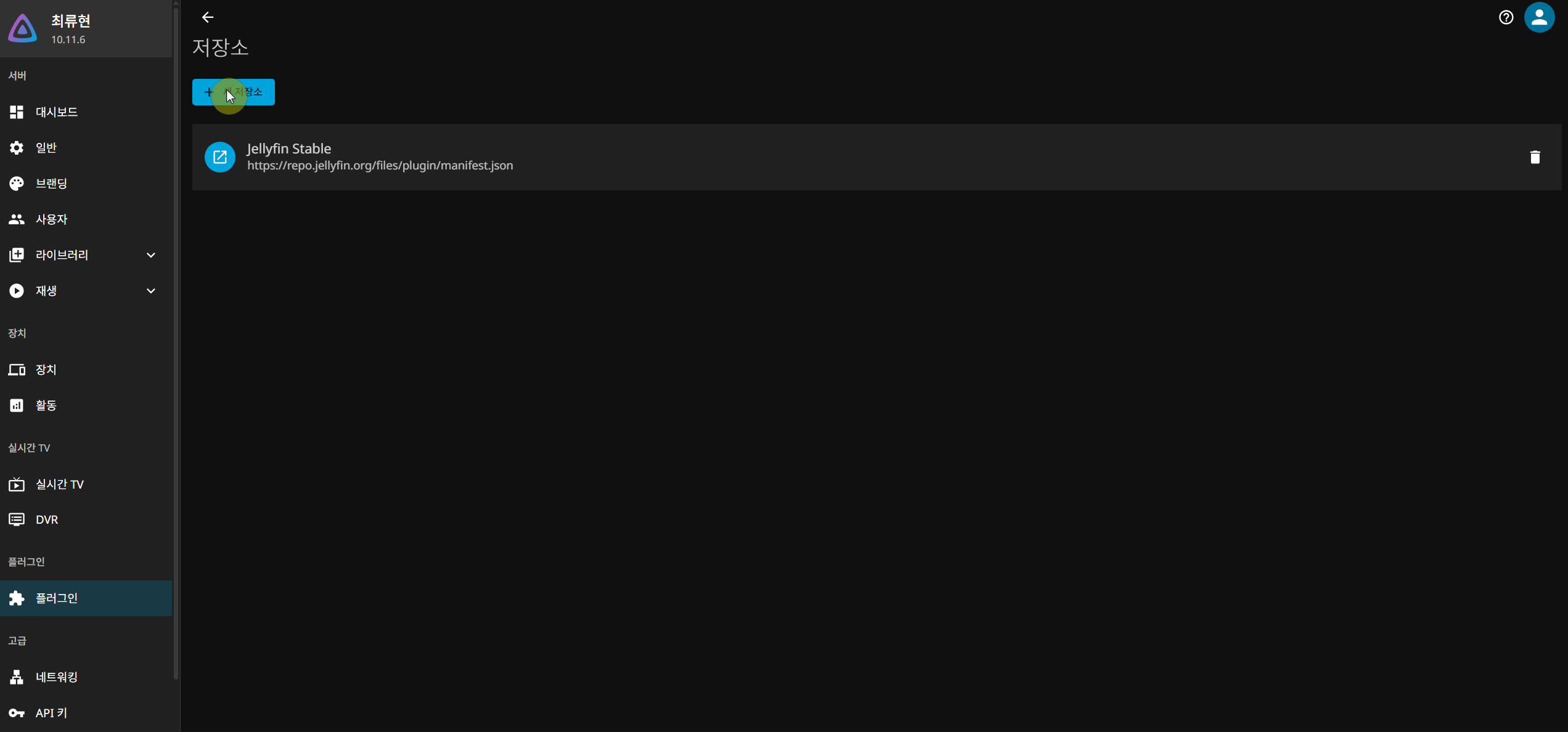
들어가면 저장소 목록이 나오는데, 여기서 새 저장소 버튼을 클릭합니다.

팝업이 뜨면 아래와 같이 입력합니다.
저장소 이름: Custom Javascript
저장소 URL
https://raw.githubusercontent.com/johnpc/jellyfin-plugin-custom-javascript/refs/heads/main/manifest.json
입력 후 추가 버튼을 누르고, Jellyfin의 Docker를 재시작합니다.
Custom JavaScript 플러그인 설치

Docker 재시작이 끝나면 다시 플러그인 탭으로 가서 검색창에 custom을 검색합니다. Custom JavaScript 플러그인이 보일 텐데, 그걸 클릭합니다.

설치 버튼을 눌러 플러그인을 설치합니다. 설치가 끝나면 여기서도 Docker를 한 번 더 재시작해줘야 합니다. 이걸 빼먹으면 플러그인이 제대로 동작하지 않으니까 꼭 해주세요.
라이브러리 검색 코드 적용하기
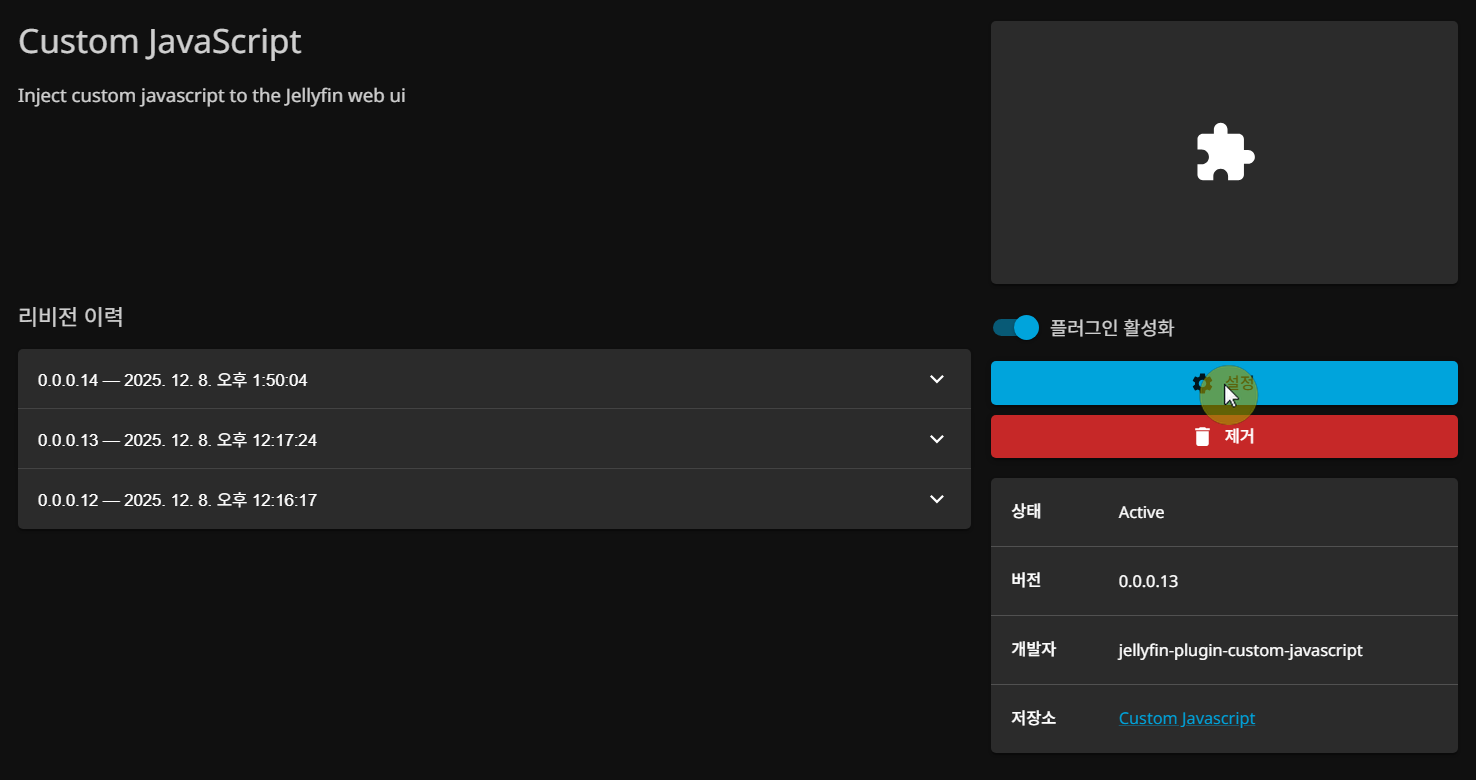
Docker 재시작 후 다시 플러그인 탭에서 설치한 Custom JavaScript를 선택하고 설정 버튼을 클릭합니다.

그러면 JavaScript를 입력할 수 있는 란이 나옵니다. 여기에 아래 코드를 그대로 복사해서 붙여넣으면 됩니다.
(function() {
  var SERVER_ID = '본인의 serverid';
  var libraries = [];
  var libReady = false;

  function getCredentials() {
    try {
      var creds = JSON.parse(localStorage.getItem('jellyfin_credentials') || '{}');
      var server = (creds.Servers || [])[0];
      if (server && server.UserId && server.AccessToken) return server;
    } catch(e) {}
    return null;
  }

  function fetchLibraries(cb) {
    var server = getCredentials();
    if (!server) { setTimeout(function() { fetchLibraries(cb); }, 1000); return; }
    fetch('/Users/' + server.UserId + '/Views', {
      headers: { 'X-Emby-Authorization': 'MediaBrowser Token="' + server.AccessToken + '"' }
    })
    .then(function(r) { return r.json(); })
    .then(function(data) {
      libraries = (data.Items || []).map(function(item) {
        var tag = item.ImageTags && item.ImageTags.Primary ? item.ImageTags.Primary : null;
        return {
          name: item.Name,
          id: item.Id,
          image: tag ? '/Items/' + item.Id + '/Images/Primary?tag=' + tag + '&quality=90&maxHeight=300' : null
        };
      });
      libReady = true;
      console.log('[LibSearch] Loaded ' + libraries.length + ' libraries');
      if (cb) cb();
    })
    .catch(function(e) {
      console.log('[LibSearch] fetch error, retrying...', e);
      setTimeout(function() { fetchLibraries(cb); }, 2000);
    });
  }

  function injectStyles() {
    if (document.getElementById('jf-lib-search-style')) return;
    var style = document.createElement('style');
    style.id = 'jf-lib-search-style';
    style.textContent = [
      '#jf-lib-results { padding: 0 0 8px 0; }',
      '#jf-lib-results .jf-lib-title { color: #ccc; font-size: 1.4em; font-weight: 600; margin-bottom: 12px; padding: 0 3.3%; }',
      '#jf-lib-results .jf-lib-grid { display: flex; flex-wrap: wrap; gap: 10px; padding: 0 3.3%; }',
      '#jf-lib-results .jf-lib-card { width: 120px; text-decoration: none; color: #fff; flex-shrink: 0; }',
      '#jf-lib-results .jf-lib-card .jf-lib-poster { aspect-ratio: 2/3; overflow: hidden; border-radius: 6px; margin-bottom: 4px; background: #222; }',
      '#jf-lib-results .jf-lib-card .jf-lib-poster img { width: 100%; height: 100%; object-fit: cover; display: block; }',
      '#jf-lib-results .jf-lib-card .jf-lib-name { font-size: 12px; text-align: center; white-space: nowrap; overflow: hidden; text-overflow: ellipsis; }',
      '#jf-lib-results .jf-lib-noimg { width: 100%; height: 100%; background: #333; display: flex; align-items: center; justify-content: center; color: #aaa; font-size: 11px; padding: 8px; text-align: center; word-break: keep-all; }',
      '#jf-lib-results .jf-lib-divider { border: none; border-bottom: 1px solid #333; margin: 16px 3.3% 8px; }',
      '@media (max-width: 600px) {',
      '  #jf-lib-results .jf-lib-card { width: 90px; }',
      '  #jf-lib-results .jf-lib-title { font-size: 1.1em; }',
      '  #jf-lib-results .jf-lib-grid { gap: 8px; }',
      '  #jf-lib-results .jf-lib-card .jf-lib-name { font-size: 11px; }',
      '}',
      '@media (max-width: 400px) {',
      '  #jf-lib-results .jf-lib-card { width: 75px; }',
      '  #jf-lib-results .jf-lib-grid { gap: 6px; padding: 0 2%; }',
      '  #jf-lib-results .jf-lib-title { padding: 0 2%; font-size: 1em; }',
      '  #jf-lib-results .jf-lib-divider { margin: 12px 2% 4px; }',
      '}'
    ].join('\n');
    document.head.appendChild(style);
  }

  function findInsertTarget() {
    var sr = document.querySelector('.searchResults.padded-top');
    if (sr) return { parent: sr, before: sr.firstChild };
    var sp = document.getElementById('searchPage');
    if (sp) {
      var sf = sp.querySelector('.searchFields');
      if (sf && sf.nextElementSibling) return { parent: sp, before: sf.nextElementSibling };
      if (sf) return { parent: sp, before: null };
    }
    return null;
  }

  function showResults(query) {
    if (!libReady) return;
    var target = findInsertTarget();
    if (!target) return;

    var resultsDiv = document.getElementById('jf-lib-results');
    if (!resultsDiv) {
      resultsDiv = document.createElement('div');
      resultsDiv.id = 'jf-lib-results';
      resultsDiv.style.display = 'none';
      if (target.before) {
        target.parent.insertBefore(resultsDiv, target.before);
      } else {
        target.parent.appendChild(resultsDiv);
      }
    }

    if (!query || query.length < 1) {
      resultsDiv.style.display = 'none';
      return;
    }

    var q = query.toLowerCase();
    var matches = libraries.filter(function(lib) { return lib.name.toLowerCase().indexOf(q) !== -1; });

    if (matches.length === 0) {
      resultsDiv.style.display = 'none';
      return;
    }

    var html = '<div class="jf-lib-title">\uB77C\uC774\uBE0C\uB7EC\uB9AC \uAC80\uC0C9 \uACB0\uACFC (' + matches.length + '\uAC1C)</div>';
    html += '<div class="jf-lib-grid">';
    for (var i = 0; i < matches.length; i++) {
      var lib = matches[i];
      var imgHtml = lib.image
        ? '<img src="' + lib.image + '" loading="lazy" alt="' + lib.name + '">'
        : '<div class="jf-lib-noimg">' + lib.name + '</div>';
      html += '<a href="/web/#/list?parentId=' + lib.id + '&serverId=' + SERVER_ID + '" class="jf-lib-card">';
      html += '<div class="jf-lib-poster">' + imgHtml + '</div>';
      html += '<div class="jf-lib-name">' + lib.name + '</div>';
      html += '</a>';
    }
    html += '</div>';
    html += '<hr class="jf-lib-divider">';

    resultsDiv.innerHTML = html;
    resultsDiv.style.display = 'block';
  }

  var pendingQuery = '';

  function hookSearchInput() {
    var input = document.getElementById('searchTextInput');
    if (!input) input = document.querySelector('.searchfields-txtSearch');
    if (input && !input.dataset.libHooked4) {
      input.dataset.libHooked4 = 'true';
      input.addEventListener('input', function() {
        pendingQuery = this.value;
        showResults(this.value);
      });
      input.addEventListener('focus', function() {
        if (this.value) {
          pendingQuery = this.value;
          showResults(this.value);
        }
      });
      console.log('[LibSearch] Hooked search input');
    }
  }

  injectStyles();

  fetchLibraries(function() {
    if (pendingQuery) showResults(pendingQuery);
    var input = document.getElementById('searchTextInput');
    if (input && input.value) showResults(input.value);
  });

  var observer = new MutationObserver(function() { hookSearchInput(); });
  observer.observe(document.body, { childList: true, subtree: true });
  hookSearchInput();
  console.log('[LibSearch] Plugin initialized v4');
})();
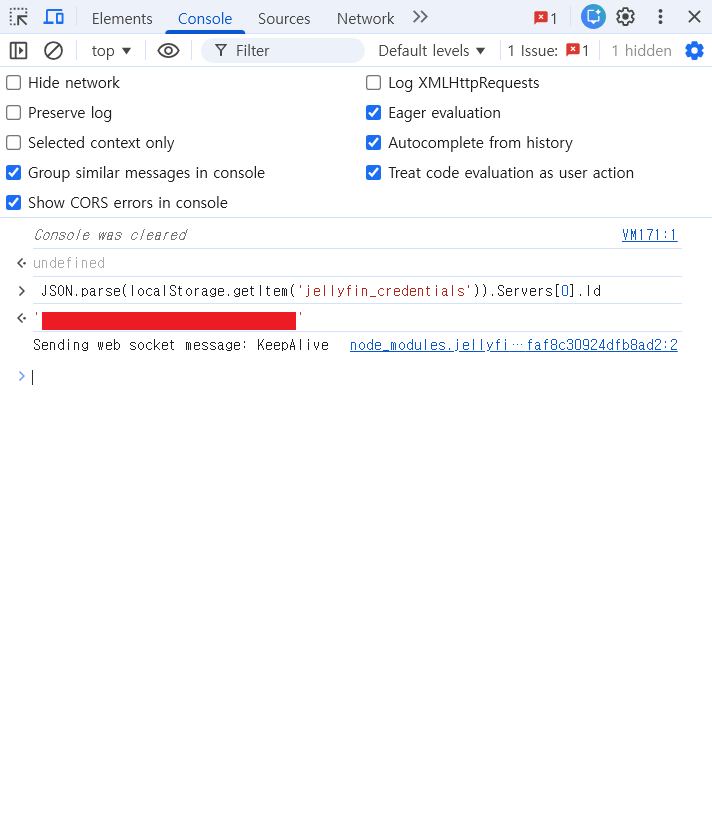
코드 상단에 SERVER_ID 부분이 있는데, 이건 본인의 Jellyfin 서버 ID로 바꿔줘야 합니다. 서버 ID는 Jellyfin 대시보드에서 크롬 개발자 도구를 키고, 콘솔창에 아래 스크립트를 입력하여 확인할 수 있습니다.
JSON.parse(localStorage.getItem('jellyfin_credentials')).Servers[0].Id
붙여넣기가 끝나면 저장 버튼을 누릅니다.
결과 확인하기

이제 끝입니다. Jellyfin 메인 화면으로 돌아가서 상단의 검색 아이콘을 누르고, 원하는 라이브러리 이름을 검색하면 해당 라이브러리가 포스터 이미지와 함께 검색 결과 상단에 바로 나타납니다.
더보기
[Ugreen NAS] 유그린 나스 Jellyfin 설치 및 설정 방법
NAS를 사용하고 계신 분들이라면, 저장해둔 영화나 드라마를 좀 더 편하게 볼 수 있는 방법을 한 번쯤 고민해보셨을 겁니다. 폴더에 들어가서 파일을 하나씩 열어보는 것도 방법이긴 하지만, 넷
newstroyblog.tistory.com
'라즈베리파이 OTT만들기' 카테고리의 글 목록
newstroyblog.tistory.com